Revit Collaboration: 5 Ways to Share a Central Model + Cost
Five ways to share a Revit central model, from a LAN to the cloud, compared on cost, remote-team performance and freelancer access, so you can pick the one that fits.


How do you collaborate on a Revit central model?
A Revit central model lets a team work on one project at the same time. Autodesk calls this worksharing. Each person works in a local copy and syncs their changes back to the central file. You can host that central file five ways: on a LAN, on a WAN, on Revit Server, in Autodesk's Forma cloud, or on a cloud workstation.
Revit's central model is how a team works on one project together. The capability is built in, but getting your people access to that central file is the real question — and there's more than one way to do it.
There are five, in fact. Three run on your own network; two run in the cloud. In this guide we walk through each one, what it does well and where it runs into limits, then give you a short way to pick the option that fits. If you're new to the central model, the next section is a quick primer; if not, skip ahead to the five options.
How Revit worksharing works
Before the five options, it helps to know the four moving parts of worksharing, because every option below is only a different place to keep the central model.

- Central model — the master copy of the project, held as one file so the whole team shares a single source of truth.
- Local copies — each person works in their own copy on their own machine rather than in the central file itself.
- Worksets — named slices of the model, such as the exterior shell, the core or a floor's interiors, that let people divide the work and stay out of each other's way (you can see them in the figure above, feeding into each local model).
- Sync — the Synchronize with Central command pushes a person's changes into the central model and pulls everyone else's back, so running it regularly keeps the whole team on one current version.
Autodesk puts the same idea plainly: “All team members save their own local copies of the central model, work locally, and then use the Synchronize with Central command to synchronize their edits to the model with the central model.” (Autodesk — Managing the Central Model) The one thing every option has to deliver is read and write access to that central model for everyone on the team, though never access to each other's computers. Where you host it decides how well that access works, and what it costs.
Deploying Revit® Central Model: 5 Options
In the rest of this blog, we’ll explain and review the 5 options you have to provide this read & write access for your team members to the Revit Central Model File. These options are crucial for sharing work with colleagues, customers and business partners with Revit®’s Central Model capabilities.
The first three options are on your own network:
- File-based on a LAN
- File-based on a WAN
- Server-based on a WAN
The last two options are in the cloud:
- Autodesk Forma Design Collaboration
- Designair's FileShare for Revit
File-based on LAN
Let’s start with File-based access to the Central Model File on a LAN
The easiest way to provide access for each colleague to the Revit ® Central Model File is on a Local Area Network (LAN). According to Wikipdedia, a LAN is
“A local area network (LAN) is a computer network that interconnects computers within a limited area such as a residence, school, laboratory, university campus or office building .”
When all team members are connected to a Local Area Network (LAN), and there is a file server connected (for example: Z://FileShare) to this LAN, then the team can use this file server as the place to store the Central Model File. The picture below explains this.
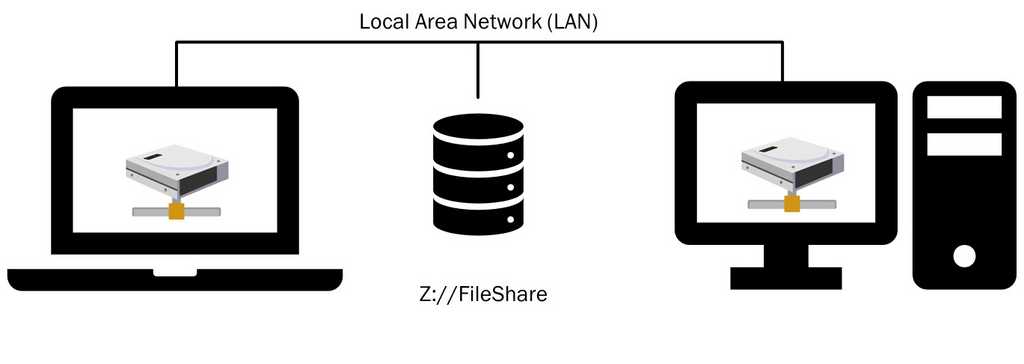
To set this up (for example, at home or in a small office), you connect your computer and a NAS device or file server to your internet router. With some minimal configuration for this device (there are consumer models available, starting below $1000 for 24 TB), you will be up and running in no time. With a VPN solution, you can extend access to this LAN to users who are not residing where the LAN is located. Little tip: If your team works on Macs, here's what you need to know about running Revit in 2026. VPN is the first of 7 ways to work with Revit "outside the building".
File-based on a WAN
The second option is file-based access to the Revit Central Model File on a WAN.
If you need to collaborate with Revit beyond your LAN – which is restricted to one building or one site, plus some VPN users – your next option is to use a Wide Area Network (WAN). According to Cloudflare, a WAN is:
“….a wide area network (WAN) is a large computer network that connects groups of computers over large distances. WANs are often used by large businesses to connect their office networks; each office typically has its own local area network, or LAN, and these LANs connect via a WAN.”
In other words, a WAN is two or more LAN’s connected. The internet is also considered on big WAN.
The schematics of working on a shared Central Model file on a WAN are shown in the next picture. Office 1 can be in Texas, whilst Office 2 can be in Timbuktu: all four computers in the schematic are connected to the Z://FileShare in Office 1.
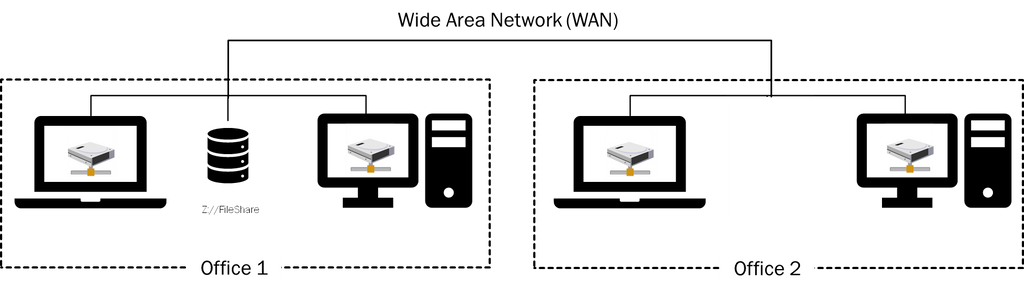
There’s a big step up in complexity and costs when you go from LAN to WAN. You need a rent a dedicated connection (‘leased line’) with a Telco provider for a stable connection with ample bandwidth between several offices (and thus the LAN’s).
The terms for these leased lines are, 1-3 years, pricing starts at $500 per month for a couple of 100 MB connections. You will need an expert network engineer to install and maintain this WAN.
The type of storage technology will also be ‘enterprise class’, and thus vastly more expensive. Our advice: if your organization already has a WAN in place, then good for you! This is a viable option that your IT organization can set up for you (for a fee). If you don’t already have this technology in place, then you will very likely not be able to justify an investment in this technology for Revit Central Model file sharing.
The cost drivers for file-sharing on the WAN are a charge for network bandwidth and for the use of the storage. A rough estimate (please check with your IT department) would be $5 per Mbit of bandwidth and $0,10 per GB of storage.
A minimum bandwidth of 15 Mbit and 100 GB of storage are good estimates of what you would need to plan per user. Your monthly bill per user is therefore estimated at $85/user.
Server-based on WAN
The next and final option to collaborate with the Revit Central Model on your own WAN is with the help of servers.
You might be wondering why you need the help of servers to share the Revit Central Model file on your WAN. The reality of doing work-sharing over a WAN is that you will be sending a lot of data back and forth between the local files on the LAN to the Central Model file over the WAN. This will eventually bog down your WAN and therefore your users. The solution that Autodesk has developed is called Revit Server. The software that is required to set this up is entirely free of charge.
The idea is to carve up the problem with the use of servers in each LAN to take a lot of the traffic load off the WAN. Each LAN has a local server (called an ‘accelerator’). Everyone who is working on the LAN is synching to this accelerator. This accelerator then syncs regularly with the so-called host at regular intervals. So, rather then each team member synchronizing via the WAN directly to the Central Model File, each team member synchronizes with the Accelerator on the LAN. The accelerator thus “collects” all the changes from the local team members. It then synchronizes the collected changes intermittently with the Central File Model (that is located on a host).
According to Autodesk,
"..Revit Server is the server application for Autodesk Revit. It is the foundation for server-based worksharing for Revit projects.
A workshared project is a Revit building model that multiple team members can access and modify at the same time. With server-based worksharing, multiple instances of Revit Server are installed at different sites and configured to perform specific roles to support optimal project collaboration across a wide area network (WAN). Together, these instances of Revit Server make up the Revit Server network.”
The schematic below shows the topology of this solution.

This server-based solution is well-suited when your file-based deployment over the WAN starts to get overloaded.
The cost of this setup is a set of additional servers for each LAN. Although Autodesk provides this software for no additional cost, this solution will have some additional costs over file-based WAN. An internal IT department will typically charge more than $1000 per server per month to keep this machine up and running. Assuming 20 users per accelerate server, this adds an additional $50 per user, per month.
On-premises or cloud?
All the options discussed so far can be defined as ‘on-premises’ - they’re about running computing power and storage services inside an organization’s own network. If your organization is subject to regulatory factors – defense-related or critical infrastructure come to mind – than the next two options (which are cloud-based) may very well be unavailable to you. Also, if your organization’s IT department distrusts the general notion of cloud (a rare stance these days), you will need to use one of the options described above.
The cloud is essentially a fancy word for outsourcing your computer power and then accessing that power over the internet. Rather than setting up and managing computer networks yourself, you lease space on a specialized company’s servers where they can set up the system you need. Your team members then connect to files in the cloud over the internet and edit them remotely.
Cloud option 1: Autodesk Forma Design Collaboration
Autodesk launched this cloud service in the mid-teens and has renamed it several times since: Collaboration for Revit, then BIM 360 Design, then BIM Collaborate Pro, then Autodesk Construction Cloud and now Forma Design Collaboration. The name keeps changing; the job stays the same. Anyone with an internet connection and a Forma Design Collaboration account can do worksharing on the Revit central model in the cloud, instead of on their own network.
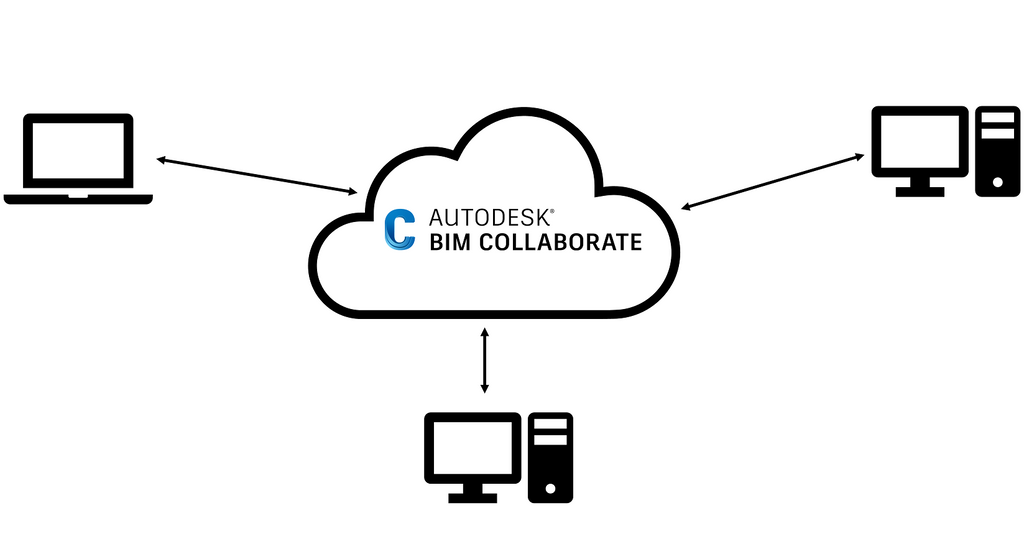
Besides these capabilities, it offers viewing capabilities, a built-in chat function and it allows admins to separate organizations and projects, and assign fine-grained access rules to users.
As this is a cloud-based service, there’s no set up or implementation required. Just sign up for the service, and start to collaborate.
For this capability, Forma Design Collaboration (the product formerly sold as BIM Collaborate Pro) lists at around $900 per user, per year in the USA on an annual subscription.
Cloud option 2: Designair FileShare for Revit
Designair provides high-end virtual desktops for architects, engineers and designers, and we recently added a FileShare service to our portfolio. This service is a shared drive that lives in the cloud, and is connected to Designair's virtual desktops.
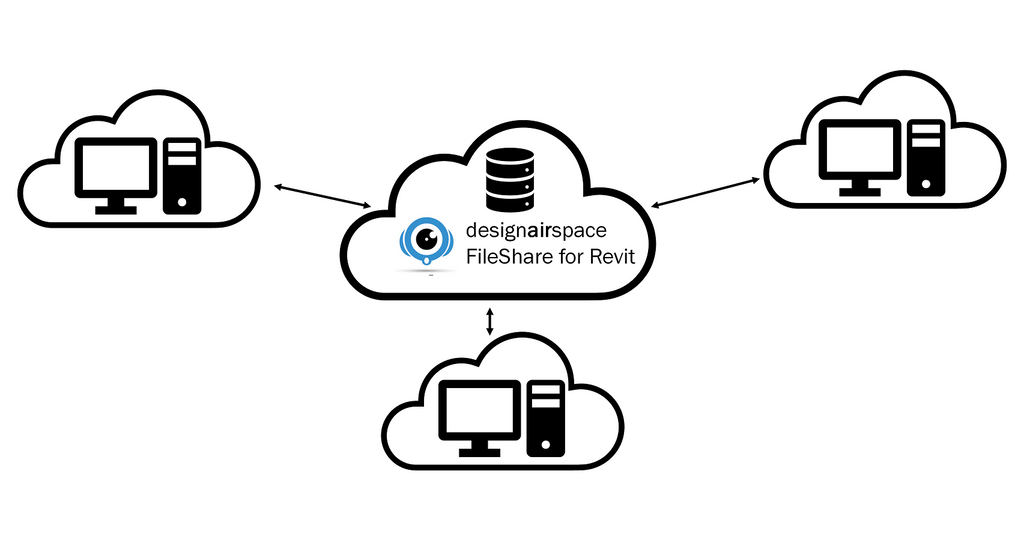
Anyone with a Designair virtual desktop and the credentials to access this FileShare can collaborate with Revit Central File Model.
This functionality of the FileShare service is comparable with the internal File Server (options 1, 2 and 3). The major different is that it is available in the cloud. It does not have the bells and whistles of Forma (such as chat options), and it is only available with a Designair virtual desktop.
For this FileSharing service we charge $40 per 100 GB per month for a premium FileShare, that is optimized for fast throughput.
You might be wondering if other Filesharing and -synching services, such as DropBox, Box.com, Google Drive or OneDrive allow you to share the Revit Central Model file. The simple answer to this question, according to Autodesk, is “no”.
What a common data environment does, and what it costs
A common data environment, or CDE, is the single source of truth for a project. It's the one agreed place where every model, drawing, document and message lives, managed through controlled workflows with version history and an audit trail — the framework for this is the ISO 19650 standard. Most CDEs do this job well. Where they differ is whether they also let a team co-author a live Revit model — Revit worksharing — which is a separate capability layered on top of the CDE, not the CDE itself.
Only one platform does both. Autodesk's own — Forma Design Collaboration, cloud option 1 above — is a full CDE and the only one that runs native Revit worksharing, mounting the cloud model straight into Revit through the Desktop Connector. Every other CDE in the table stores, coordinates and reviews Revit models, but stops short of live co-authoring.
If you want a CDE and Revit worksharing from a single vendor, Forma is the only one that gives you both — at around $900 per user, per year.
You don't have to buy them together, though. Worksharing only needs a shared drive the whole team can read and write, which is what Designair FileShare for Revit gives you at $40 per 100GB, per month. Run any CDE you like alongside it — or the one your client already mandates — for coordination and document control. Pairing FileShare with a separate CDE keeps the worksharing, keeps the CDE, and costs a fraction of the single-vendor price. It also gives you the performance gain covered in the next section, which the all-in-one route does not.
Where cloud worksharing runs into trouble
Worksharing in the cloud is powerful, but teams who run it daily report the same friction: slow model opens, long syncs, the odd crash and disconnect — worst on large projects with many linked models, and even on fast connections. Autodesk acknowledges the performance issue and suggests workarounds.
The root cause is the network. Revit was built for LAN-based worksharing, where the central model sits a few metres away. The cloud stretches that link across the public internet, and performance now depends on bandwidth, latency and a stable connection — exactly the things that wobble when people work from home, on the road, or from an office with patchy infrastructure.
There's a fix that keeps the worksharing and removes the bottleneck: move Revit itself onto the internet, not just the model. Run Revit on a cloud workstation, and it sits on the data centre's connection — enterprise bandwidth, low latency, always on — instead of a home or office line. That's the difference between a laptop's internet connection and cloud speed: 50 to 100 times faster. The heavy traffic between Revit and the cloud model now travels over that fast pipe rather than crawling up consumer broadband. Models open faster, syncs finish in seconds, and the timeouts that cause most crashes largely disappear. That's the firm's case for a cloud workstation over a faster home line.
Running into collaboration problems with your current setup? Try Designair free →
How to pick: five common setups
Which of the five fits depends less on the technology than on where your people sit and how much IT you want to run. Here are the five situations we see most often, and the option that tends to fit each, with a rough monthly cost per user.
- One office, everyone on site. File-based on the LAN. It is the simplest and lowest-cost option: a NAS or file server (consumer units start below $1,000 for 24 TB) on top of the IT you already run. Add a VPN, at about $20 per user per month, if a few people occasionally work from home.
- Two or more offices. If you already run a WAN, keep the files on it (around $85 per user per month) and add Revit Server when syncs start to bog down (about $50 per user per month on top). If you do not have a WAN and would rather not build one, a cloud host is the more sensible route: Forma Design Collaboration at roughly $900 per user per year, or Designair FileShare for Revit at $40 per 100 GB per month.
- Remote and work-from-home staff. LAN-plus-VPN works but adds cost and slows down at peak hours. A cloud host handles distance better: Forma, or Revit running on a cloud workstation with FileShare, so the model sits on the data-centre connection rather than a home line — 50 to 100 times the bandwidth, which is what keeps opens and syncs fast.
- Freelancers and outside consultants. The on-network options are closed by design and awkward to open up for a short engagement. A cloud option is the practical route: Forma if you want the full common data environment with its chat and admin controls, or Designair FileShare on a virtual desktop you rent by the month and cancel when the project ends.
- No appetite to run IT. If there is no one to build and maintain a server or a WAN, skip anything you have to deploy. A managed cloud service leaves nothing to set up: Forma at about $900 per user per year, or Designair FileShare at $40 per 100 GB per month on a virtual desktop that is managed for you.

The simplest, most affordable option to work with the Revit Central Model File is clearly on the LAN. In combination with a VPN solution it is still viable for WFH, but VPN does add costs (about $20/month per user) and at some point you will run into performance issues, especially at peak hours.
If you already have a WAN in place, and your organization can not or will not move Revit files outside its own premises, then this is your best option. If you run into any performance bottlenecks, you can extend the usefulness of your WAN setup with Revit Server. With a VPN, you can extend the WAN to WFH users, with the same caveats as for the LAN.
In comparison with WAN-based collaboration, Forma is definitely more affordable, and offers more capabilities beyond file-sharing. But it is out of bounds if your company can not or does not want to have its Revit files in the cloud.
And finally, there’s Designair FileShare for Revit solution. It offers the same – no frills – approach to worksharing with Revit as on your LAN or WAN, at a fraction of the cost of Forma and WAN-based deployments. Bear in mind that FileShare for Revit is only available with the virtual desktops of Designair.
This may not be as big as a drawback as you think. Virtual desktops are ideal for temporary projects with multiple companies: you can rent these by the month, and cancel them when your project is done. What is more, the combination of desiginairspace’s virtual desktops with cloud-based FileShare will keep your Revit data more secure than any of the other 4 options – by greatly reducing the vulnerability that laptops and workstations are exposed to.
Virtual desktops are also becoming a very popular option to reduce companies’ reliance on expensive office space and allows architects to choose where they want to work.
Wondering whether VDI or DaaS is the right model for your firm? Here's how the two compare for architecture teams."
Is your Revit collaboration setup holding your team back?
Most architecture firms patched their remote setup during COVID and never fixed it properly. If your team is dealing with slow syncs, VPN headaches, or weeks of delay getting external consultants productive — the problem isn't Revit. It's the infrastructure underneath it.
See how architecture firms fix it → Try Designair free for 14 days
Revit collaboration: frequently asked questions
What is Revit collaboration?
Revit collaboration, or worksharing, lets a whole team work on one project model at once. Each person edits a local copy and syncs their changes back to a shared central model.
Can Revit do real-time, multi-user collaboration?
Yes, through worksharing. It is not live like Google Docs — each person works in a local copy and syncs to the central model on demand, which merges everyone's changes.
What are the options for collaborating on a Revit model?
Five, by where the central model lives: file-based on a LAN, file-based on a WAN, Revit Server on a WAN, Autodesk Forma in the cloud, or Designair FileShare on a cloud workstation. All five are compared above.
What does Revit collaboration cost?
It depends where the central model lives: an on-network file costs only your existing IT; Autodesk Forma about $900 per user, per year; Designair FileShare $40 per 100 GB, per month for the team. Full comparison above.
How do you collaborate in Revit across remote teams or multiple offices?
For two or more offices, use a WAN if you already run one, or a cloud host if not. For remote and WFH staff a cloud host handles distance best — Forma, or Revit on a cloud workstation with FileShare.
Can freelancers or outside consultants work on a Revit model?
Yes, and a cloud option is usually simplest, since on-network setups are closed by design. Forma works, or Designair FileShare on a virtual desktop you rent monthly and cancel when the job ends.
What internet speed do you need for Revit cloud collaboration?
Stable, low latency and enough bandwidth matter more than raw speed. Cloud worksharing slows on large models over a home line; running Revit on a cloud workstation puts the heavy traffic on the data-centre connection instead.
Can you use Dropbox, Google Drive or OneDrive for a Revit central model?
No. Autodesk does not support worksharing on Dropbox, Google Drive or OneDrive — sync conflicts corrupt the file. Use a proper file server, Revit Server, a cloud workstation drive, or Autodesk's own cloud.