
CAD VDI: Cost, Performance and Build vs Buy
What CAD VDI costs for Revit and ArchiCAD, and whether to build or buy: a build-vs-buy comparison, a cost calculator, and a trial on your own models.


What is CAD VDI?
CAD VDI hosts graphics-heavy CAD software such as ArchiCAD, Revit and AutoCAD on centralised servers and streams the screen to any device: a GPU in the data centre renders the 3D graphics, and the engineer sees only the resulting pixels. Because the files never leave the server, a lost or stolen laptop exposes no files. All of that is settled and uncontroversial. The two questions you face are what a virtual workstation costs each month, and whether to build one or buy it.
Why CAD resists virtualisation
Office VDI has been routine since the days of the Citrix farm, but CAD stayed on physical workstations until the mid-2010s, and the reason was always the GPU. Revit, SolidWorks and Civil 3D use OpenGL or DirectX to draw geometry in three dimensions, so the moment an engineer rotates or pans a large assembly they need 30 to 60 frames a second to feel no lag. Take the GPU away and the picture stutters, and an engineer who feels that stutter abandons the whole idea inside a minute.
Two numbers determine whether CAD on a virtual desktop is usable. The first is the frame rate, the number of times the screen redraws each second, which has to reach at least 30 and ideally the 60 a local workstation already delivers. The second is latency, the delay between moving the mouse and seeing the screen respond, which has to stay under about 30 milliseconds, or rotating a model feels sluggish. Achieve both and the virtual desktop feels like the machine under the desk; fail either and no cost saving will persuade anyone to keep using it.
The two ways to deliver the GPU
There are two ways to attach a GPU to a virtual machine. The first, partitioning, splits one graphics card into fixed slices and gives each virtual machine a guaranteed share of the GPU and its memory; a datacenter-class NVIDIA A16 or A40 serves a handful of CAD users this way, and the size of each slice sets how many. The second, pass-through, attaches a whole physical GPU to one machine, which makes it the fastest and the closest to a desktop workstation, and also the most expensive, since that card now serves a single person. Pass-through suits the power user whose simulations need every cycle, and partitioning suits everyone else.
Sizing the slices is the hard part of partitioning. Size them for the average user and the heavy users suffer at project peaks; size them for the peak and much of the GPU goes unused the rest of the time.
Matching the machine to the work
Not every CAD user needs the same machine, so the sensible approach is to size the machine to the work rather than give everyone the same profile. Three profiles cover most roles in a firm.
The reason to match is cost as much as performance. A light 2D drafter on a workstation with no GPU costs a fraction of a visualiser’s, so paying for a heavy GPU a detailer never uses is wasted money, whether you build the environment or buy it.
What your modellers notice
Adoption depends on the first impression on the machine. A modeller judges the workstation the moment they pan, rotate and zoom a large model, and the verdict is binary: either the view keeps its frame rate and stays smooth, or it tears and stutters and they reject it. Get that impression right and your team stops noticing the machine is virtual; get it wrong and they refuse to use it.
CAD VDI or a workstation under the desk?
Before choosing how to run CAD VDI, there is a fair prior question: why not give each engineer a powerful workstation or laptop instead? On cost alone a physical machine often costs less, and CAD VDI is no saving over one, so adopting it only to trim an IT budget will fall short. The case for it is in what a physical workstation cannot do: put the best person on a job wherever they live, onboard a consultant the same day instead of shipping a machine, attract and keep BIM talent by offering real remote work, and keep nearshored detailing in the live model instead of a separate copy nobody controls. If none of that matters to your firm, a workstation under the desk is the simpler answer. If it does, the decision is whether to build the environment or buy it.
Build it yourself
Building it means you own the whole environment: the servers, the licences, the administration and the risk. A self-built setup needs an administrator, so sizing the slices, patching the hosts and supporting the users is day-to-day work for your own team. Size a slice below the model’s memory, or place the data centre too far from the user, and the workstations stutter; getting that right is a risk you own.
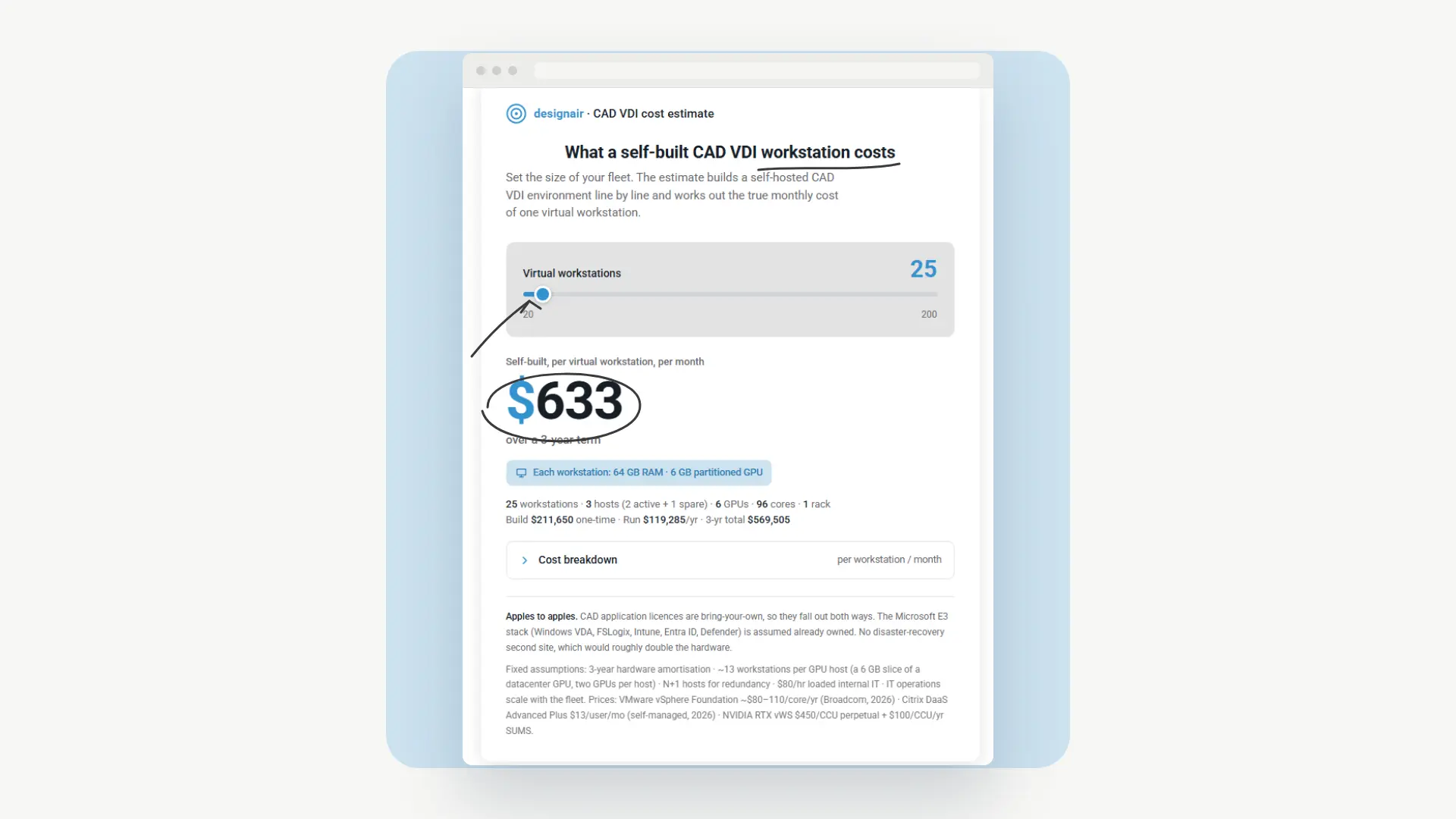
A self-built virtual workstation, classic on-premise VDI, is a capital expense, so it costs mostly constant every month: the hardware, the data-centre space, the licences and the IT time are all paid for whether anyone logs in or not. Added up, a classic VDI workstation runs about 500 to 600 dollars per user per month, whether it is used for two hours or two hundred.
Those numbers depend on your fleet size, your hardware and how many users share each server. Put in your own and see what a self-built workstation comes to:
You can lower the figure by putting more users on the same hardware, but that thins every slice, and thinner slices bring the stutter back.
Built well and kept busy, building can be the right call: heavy, constant use covers the fixed cost fully, and where on-premise rules are strict, the models never leave your own walls.
Buy it as a service
Buying it is what the industry calls VDI-as-a-service: workstations scale up and down on demand, you are billed by the hour, the desktop opens from any location, and everything runs on shared infrastructure, which is why you pay for what you use instead of for hardware that goes unused. It is also self-service, so your own people create and retire workstations the way they would order something online, with no administration team in between.
Designair is one such service, built for CAD and BIM specifically, not as a general-purpose cloud desktop. We support Revit, ArchiCAD and most 3D CAD applications rather than a broad Office market, and every workstation we hand over comes from a single master image, so a full-time user and a freelancer open the same version of the software with the same plugins. That shared image removes the version-mismatch crashes you get when different users run different builds and plugins.
The cost works the opposite way to a self-built one: it rises when you use the workstation more and falls when you use it less. With us, a workstation is about 50 dollars a month plus 2.25 dollars for each hour of use. Averaged across our customers it comes to about 205 dollars, on about 70 hours of CAD and BIM work a month, and that is the figure we tell you to plan with; most guess the hours higher. The public benchmark is here: https://www.designair.io/benchmark
Two things follow from a bill that changes with use. A casual user never reaches 200 dollars, so you stop paying full price for a workstation nobody is using. And when a workstation does cost more than 200, the hours behind it were likely billable to a client, which means your most expensive months are the months you were earning. A workstation at a flat monthly price does neither.
But isn’t cloud CAD just insecure shadow IT?
It is the first question a careful IT director asks, and the honest answer is that a specialist service is more controlled than the laptops your team uses now. The design files never leave the data centre; only the screen reaches the device, so a lost or stolen laptop exposes nothing. We are ISO 27001 certified. Single sign-on ties access to your own identity provider, so a joiner or a leaver is handled once, in one place. Microsoft Intune manages the endpoints, so your existing device policy keeps applying instead of being worked around. And the parts a firm normally has to build itself, connecting an existing fileshare, a particular single sign-on setup, an extra service, we do as bespoke work. That gives your IT director a platform to approve, not shadow IT to shut down.
For how this differs from other cloud-CAD options, see our VDI vs DaaS comparison and the menu of remote CAD setups.
The answer to “will it work?” - where are the specs?
Every spec question comes down to one thing: will the workstation feel real? A VDI-as-a-service provider answers that worry by taking on the technical risk, since it has already built the environment, made the sizing decisions and put it online. That is why the choice is not about weighing GPU profiles on a slide. It is about a test.
So we let you run one. Up to five BIM users get an environment on your own software, your own models and your own network, and it is ready in days. Put a real model on it and pan, rotate and zoom, because that movement is what shows whether the graphics stay smooth. Nothing is signed, so if the test disappoints, you leave having spent a few hours rather than a year’s hardware budget. Sign up here: https://www.designair.io/free-trial
Build or buy at a glance
Having covered both in depth, the decision comes down to a few dimensions.
Where to start
If you are still comparing options, start with the build VDI calculator in this blog, and head over to our public billing benchmark, which together show how a VDI-as-a-service workstation compares with a self-built one on cost for your team. If you are not ready to trial anything, the pan-rotate-zoom test above works for any provider, us included. And once you want to know whether it feels like the workstation your engineers already trust, the trial settles it on your own software and models, with no commitment: https://www.designair.io/free-trial
FAQ
Does CAD run well on VDI? Yes, when a real GPU powers the virtual desktop and latency stays under about 30 milliseconds. Frame rates then stay within a few frames per second of a local workstation for Revit and SolidWorks. Without a GPU, CAD stutters and users reject it.
What does CAD VDI cost per user? A self-built, classic-VDI workstation costs about 500 to 600 dollars a month, fixed regardless of use. VDI-as-a-service like Designair has a base fee near 50 dollars plus about 2.25 dollars an hour, averaging near 205 on about 70 hours a month. See the public benchmark: https://www.designair.io/benchmark
What machine do Revit and ArchiCAD need on VDI? A 3D CAD and BIM workstation, and heavy 2D drafting, want 64 GB of memory or more and a 4–8 GB GPU. Light 2D drafting needs 32–64 GB and no GPU, and visualisation or rendering wants 32–64 GB with an 8–16 GB GPU. Sizing the machine to the work is what keeps the cost down.
Cloud CAD VDI or on-premise? On-premise means buying, sizing and running the hardware yourself, with the performance risk on you. A cloud or VDI-as-a-service model moves the sizing, certification and risk to the provider and bills per use. The right answer depends on whether you want to run the infrastructure or the projects.
Does CAD VDI work with the latest AutoCAD and Revit versions? Yes. Certified driver and GPU configurations from Autodesk, Dassault and Siemens support current CAD releases. A VDI-as-a-service provider maintains these configurations and the per-application settings each release needs.
Is CAD VDI secure? The design files stay in the data centre and only the screen reaches the device, so a lost or stolen laptop exposes nothing. Central management also keeps patching, MFA and access policy uniform across every virtual workstation.
How do you scale CAD VDI for a growing team? A VDI-as-a-service adds virtual workstations on demand, so a firm can staff up for a deadline and release them afterward. A self-built environment scales only as far as the hardware it was sized for, which is why over-provisioning ends in a worse experience.
What internet connection do you need for CAD on VDI? Latency to the data centre under about 30 milliseconds matters more than raw speed; keep it low and 3D work feels local. For bandwidth, 10 to 25 Mbps per user carries a smooth 3D stream, which ordinary home broadband handles. Placing the workstation in a data centre near your users is what keeps the latency down.
How do you set up CAD VDI? There are two ways: build it or buy it. Building means sizing and buying servers, GPUs, storage and networking, licensing the virtualisation and VDI software, building a master image with your CAD apps and certified drivers, then running it, months of work for a specialist team. Buying it as a service means the provider does all of that and you create workstations yourself, ready in days.
Is there a free trial for CAD VDI? Designair runs a done-for-you trial: up to five BIM users get an environment on your own software, models and network, ready in days, with nothing to sign. You put a real model on it and test the performance yourself.


